
Resource Center

Clear Measure provides resources to empower software leaders and developers in software delivery, fulfilling our vision to improve and inspire software teams worldwide.
If your team uses Cursor on an enterprise plan, there's a good chance someone has a browser tab open right now to the Cursor dashboard. That tab exists because the usage view inside Cursor never worked on our enterprise accounts. The only reliable way to know how much of the month was left was to leave the editor and go look. We got tired of the tab. So we built Cursor Usage Status, a small extension that puts your usage in the editor's status bar, where you're already looking. Usage you could only see in a browser For one developer, checking a dashboard now and then is a minor annoyance. For a team, it adds up. Nobody knows they're close to the limit until they hit it, and whoever is responsible for the budget finds out after the fact. We kept the dashboard pinned in a tab and checked it between tasks. The number was always there. The problem was that nobody looked at it when it mattered. Putting the number where developers work The idea was simple: take the same usage data the dashboard shows and put it in the status bar, refreshed in the background every few minutes. The catch was that none of it was documented. Cursor doesn't publish a usage API for third-party tools. So the extension works the way the dashboard does. It reads your existing Cursor sign-in from Cursor's local database and calls the same Cursor-hosted endpoints the dashboard uses. There's no separate login and nothing to configure. The first version shipped in April. Enterprise accounts were billed by request quota at the time, so it showed the requests you had left for the model you cared about. On Team and Pro accounts, it showed remaining dollars. Either way, the tab could close. The cost of building on undocumented endpoints We knew those endpoints could change without warning. In August, they did. On August 24, 2026, Cursor replaced request quotas with token-based pricing, billed as dollar spend against a per-user monthly cap. The routes the extension depended on were deleted. There was no quota left to report and no endpoint left to ask. Letting it go would have meant going back to the browser tab, now watching a dollar figure instead of a request count. So we rebuilt it around the question every developer on a token plan now has: how much have I spent, and will it last the month? What the rebuilt extension shows Every refresh pulls three things from Cursor: what you've spent this cycle, your per-user monthly limit, and when your billing cycle started. The status bar shows what's left, like "$60.67 left." Hover over it, and the tooltip breaks down spend by model, with input and output token counts for each. When one model is running up the bill and another costs almost nothing, you want to know that before the month ends, not after. A few other details came out of using it every day:
  • Going over the limit is explicit. Instead of pinning at "$0 left," the status bar shows how far over you are, like "$12.40 over," and turns red.
  • Free usage is labeled, not hidden. Models running on team credit grants report tokens but no cost. The extension marks them as free so you can still see how much work they're doing.
  • It projects your pace. Based on how fast you've spent so far this cycle, it estimates when you'll hit your limit and lets you know if that lands before the reset.
We were careful not to build something that nags. Notifications only fire when the projection gets worse. If your pace holds or improves, you won't hear from it. You can dismiss alerts for the rest of the cycle, and they come back on their own when the next one starts. It also won't guess until there's enough data to mean something: at least 15% of the cycle elapsed and 5% of the limit spent. What rebuilding taught us Building against a pricing model that was days old meant running into things nobody had written down. The first cycle wasn't a month. The pricing change produced a short billing cycle from August 24 to September 1. Cursor cycles aren't reliably aligned to the calendar, so the extension uses the end date Cursor reports whenever one is available and only falls back to calculating one month from the cycle start when it isn't. The dashboard runs a little behind. While testing, we watched the dashboard header read 70 cents while live spend sat at $0.7673. About ten minutes later the header caught up to 77 cents. The header is driven by a separate counter that's rounded and updated on a delay. The extension reads the live figure, so it can briefly show a little more than the header. The dashboard's "Total usage" tile matches what we report. The shortcut we chose not to take There was an easier way to get one of the numbers we needed. Cursor has an endpoint that returns the dashboard's overall spend figure directly. The problem is that its response includes every team member's name and email address, with no way to filter it down to just you. We decided the extension would not call it. Nobody installing a status bar widget should pull their coworkers' personal information onto their machine to see their own spend. The same thinking shaped the rest of the security design. The extension reads your access token from disk on each refresh and never stores it. The token only travels over HTTPS, and only to the API origin you've configured. Error messages stay generic so tokens and file paths don't end up on screen. AI Slop Cursor Usage Status is unofficial. It isn't affiliated with or endorsed by Cursor, and it depends on endpoints Cursor doesn't document and can change at any time. We've already seen that happen once. If it happens again, the extension may break again, and we'd rather say that up front. What we took from it Once AI coding tools bill by the token, usage stops being a quota you might bump into and becomes a budget someone is accountable for. That makes visibility more important, and it matters where developers are working. A number in a browser tab gets checked when someone remembers. A number in the status bar gets seen all day. Try it Cursor Usage Status is free and MIT licensed. It's verified on Team accounts, and Business and Enterprise plans resolve the same way. Individual and Pro plans are untested. Cursor doesn't report a limit for those accounts, so you can set your own in the settings to get a remaining balance and warning colors. Download free
Since 2005 and Continue Integration coming on the scene, and then 2010’s advent of DevOps, the industry has had some stable principles for a complete DevOps environment: builds, deployments, observability, and much more. AI-Driven Development is changing the default structure of a DevOps environment. Build servers? Octopus Deploy? Azure? How do they need to be used differently? Besides individual driving of AI agents, where do AI tools plug into the DevOps pipeline itself? This training covers it all and proposes new architectural elements for an AI DevOps Environment Webinar transcript: https://clearmeasure.com/transcript-ai-devops-environment-solutions-benefits-challenges/
Cursor has multiple usage modes — from the VS Code fork to the agents window, the command line interface, the iOS app, and the website in a browser. Cursor also has fully functional cloud environments on demand that can be run programmatically as part of any application using the SDK. When practicing AI-driven development, merely using Cursor is not automatically going to increase your quality, your software stability, or your speed of software delivery. In this training, Jeffrey Palermo, Chief Technology Officer of Clear Measure, an AI-driven software architecture company, gives you the right architectural thinking about how Cursor fits into your existing development environment, and what architectural elements you need in order to up-level your existing DevOps environment to a fully featured AI DevOps environment. You will see ways to completely delegate some features to Cursor while choosing to develop more complex features interactively, using the different Cursor usage modes. You will learn how to measure your Cursor implementation to know if the quality of your software is increasing or decreasing, if the stability of your system in production is getting better or worse, and if your team is actually speeding up and delivering more — or silently slowing down.
And you will walk away knowing how to deliver a report that makes sense to management so that they can see the return on investment of your Cursor investment. Webinar transcript: https://clearmeasure.com/cursor-for-ai-driven-development-transcript/
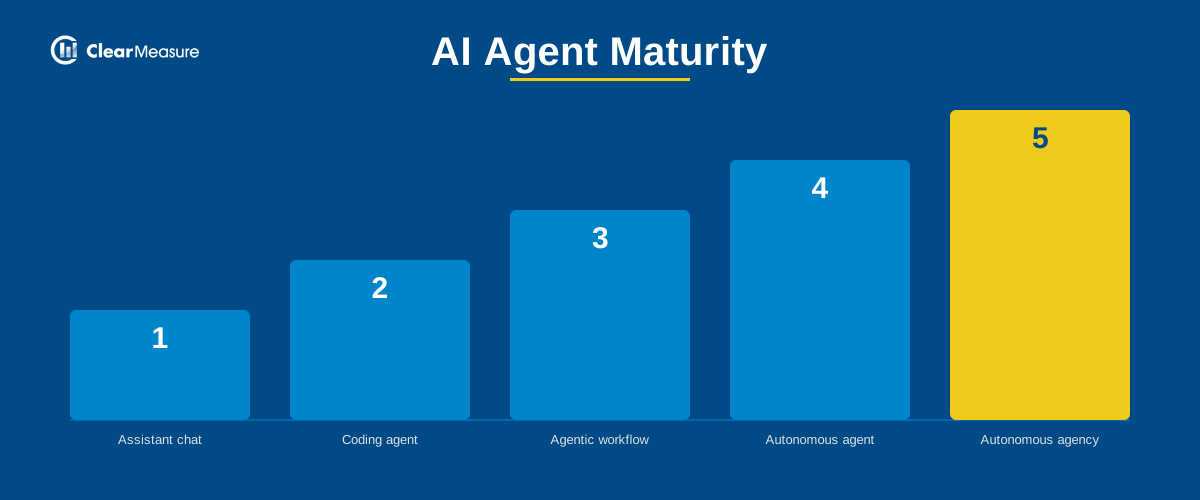
AI Agent Maturity: The 5-Stage Framework Engineering Leaders Need to Know   Most conversations about AI agents treat them as one thing, but there are five distinct stages, each demanding a different level of trust and a different time scale, from seconds to weeks. In a recent episode of the AI DevOps Podcast, returning guest Matthew Renze, an AI researcher and consultant who has trained over half a million developers and IT professionals worldwide, laid out those stages.   For most of the past decade, Renze's predictions about AI kept sliding further into the future, always a few years away. That changed around late 2025, when he started seeing agents reliably complete around 100 steps on a task, up from the 10 to 20 steps he'd been benchmarking. Capability gains have also accelerated resulting in gains that used to double roughly every seven months are now doubling about every four.   That's the kind of pace that raises real budget questions, and podcast host Jeffrey Palermo pushed on exactly that before Renze got into specifics: an agent that runs constantly "seems incredibly expensive," he said, so what are the use cases where it's not? Renze's answer was the five-stage framework below.   The Five Stages Renze frames this as a spectrum, and most people are somewhere on it without realizing where.   Stage one is a simple assistant relationship: working with a chatbot one step at a time, answering questions, searching, drafting a document. This is where most people working with AI sit today.   Example tools: ChatGPT, Claude Chat   At stage two, you're collaborating with a coding agent or coworker agent on individual multi-step tasks. You specify what's needed, the agent runs a few steps, comes back if it needs more information, and you then review the completed task.   Example tools: GitHub Copilot, Claude Code, OpenAI Codex   Stage three moves into supervising agent workflows: non-sequential, branching processes where a sub-agent handles each node in the graph and hands its work to the next agent in the chain.   Example tools: LangChain / LangGraph, Microsoft Agent Workflows   By stage four, you're managing a goal through a fully autonomous agent, the kind that runs on its own machine, checks in through chat, and works against a task board with minimal interruption.   Example tools: OpenClaw, Hermes   Stage five, which Renze describes as highly experimental, is leading a mission through an autonomous agency: a multi-agent system organized like a company, with a manager agent delegating to agents in specific roles, all working from a shared mission and shared operating procedures.   Example tools: PaperClip AI   As you move up the stages, the unit of work you can safely hand to AI increases, and so does the time scale, from seconds at stage one to days or weeks at stages four and five.   Why the Growth Rate Matters More Than the Snapshot At Anthropic, roughly 80 to 85 percent of code is now written by AI agents rather than humans, a shift Renze says took hold within about six months of the industry recognizing that coding agents had become capable. The practical implication for engineering leaders is that whatever agent capability you're evaluating today will likely be roughly twice as capable in about four months. Renze's advice is blunt: if you are running a model that is three to six months old, replace it with the current generation and see what changes.   Calculating ROI Before You Automate Renze's approach to ROI is grounded in what a business already does, not what it could hypothetically do. Start with an existing task that already has a known cost profile, a person or team already doing it, and compare that against the cost of running an agent to do the same work. Until the agent's cost falls below that existing baseline, the automation doesn't pay for itself yet.   For early-stage or exploratory work, there often isn't a clean baseline to compare against. In that case, Renze's approach is closer to a rough estimate of anticipated cost against anticipated value, while acknowledging that some of the value, like market understanding, is real but not directly quantifiable in dollars.   The gap between what simple prompting costs and what a running coding agent costs is bigger than most people assume. Jeffrey pushed on this directly: it isn't just double the token cost, it can be a factor of 10 or 20. Renze agreed, and pointed to where the real spend shows up: his own research and production workloads can run into the billions of tokens depending on which stage of the agent is running and how many are active at once.   Token Economics: Short-Term Constraint, Long-Term Bet Renze expects token pricing to stay flat or rise in the near term, driven by GPU, fab, and data center capacity constraints that haven't caught up with demand, particularly in the United States relative to countries investing more aggressively in energy and data center infrastructure. Longer term, his expectation, shared broadly across the industry by his account, is that token costs drop close to zero as efficiency gains compound: better GPU design, new architectures, and algorithmic improvements like lower-bit-precision model weights.   That expectation is part of why some organizations keep spending heavily on tokens now rather than waiting: first-mover advantage compounds, and building a company around the assumption that tokens will eventually be as cheap and unmetered as electricity is itself a bet worth making early.   What Carries Over From Existing Practice, and What Doesn't Jeffrey framed the question in terms every engineering team will recognize: a batch job that starts up, listens for a trigger or runs on a schedule, sits behind a web API, queries a database, and once it's live gets automated tests, health checks, and IT monitoring, watching memory and uptime. How much of that carries over to an autonomous agent, and how much doesn't?   Renze described a mixed picture. Principles like high cohesion, low coupling, and a single source of truth hold up well with agents, just as they did before. Other agent behavior, like branching into multiple sub-agents mid-task and merging the results back together, has no clean equivalent in how a single person works, and Renze said he's still rethinking those cases from first principles rather than assuming an existing pattern applies.   The Takeaway The distinction that matters isn't whether your team is "using AI." It's which of these five stages a given task requires, whether the cost of running an agent at that stage has crossed below what the task already costs your team, and whether you're rebuilding practices that don't need to change or rethinking the ones that do.   If you're not sure which stage your team is ready for, that assessment, matching the task to the right stage and the right level of trust, is exactly where a lot of teams get stuck. One production support team at a digital-first commercial insurance company was losing dozens of developer hours a week to import failures, log investigation, and task refinement, the kind of repetitive work that sits squarely at stage two. Clear Measure led their Cursor rollout: training for developers, team leads, BSAs, and QA, plus dedicated sprint time to rebuild the team's workflows around the new tooling. Import failure resolution time dropped from about an hour to about 15 minutes. See how we approach AI tooling support for teams making that same jump.    Listen to the full conversation with Matthew Renze on the AI DevOps Podcast.
Artificial intelligence is transforming software development, but its impact extends far beyond code generation. This session examines AI through an engineering lens, starting with the computational realities of large language models: they can answer well-formed questions and generate solutions, but they cannot reliably formulate hypotheses, determine when a task is complete, or evaluate the quality of their own output. These limitations make external validation, testing, and architectural oversight essential. The presentation explores the practical implications for software teams, including distinguishing architectural concerns from implementation details, applying risk-based code review, and redesigning build-and-test pipelines to keep pace with AI-accelerated development. It also revisits Fred Brooks’ surgical-team model, arguing that AI amplifies the effectiveness of small, highly skilled teams rather than replacing engineering judgment. Finally, it considers the economic and organizational consequences of dramatically reducing the cost of software creation and examines why software measurement techniques such as function-point analysis remain relevant. The central argument is simple: AI changes how software is built, but the fundamentals of architecture, quality assurance, and systematic validation become more important—not less. Webinar transcript: https://clearmeasure.com/ai-driven-software-engineering-transcript/  
In this episode, host Jonathan “J.” Tower sat down with Jeffrey Palermo, CTO and Chairman at Clear Measure, to talk about what changes in software development once AI writes much of the code, and what doesn’t. Jeffrey argues this shift is different in kind from the web, agile, mobile, and cloud transitions that came before it, because it changes how we interact with a computer rather than just how we write code. He’s equally direct about the limits. A language model is very good at answering questions and has no way to come up with one worth asking, which is the part that still has to come from us. From there, J. and Jeffrey get into why the definition of “good” has to come from outside the model. In practice, that means automated tests as the external standard and builds fast enough to keep pace with how quickly AI now changes code. Jeffrey makes the case that the ten-minute build that felt fast in the DevOps era is too slow now, and that getting down to two minutes means running every stage in parallel instead of in sequence. They also dig into which code is structural and which is decoration (his skyscraper analogy is worth the listen), why Fred Brooks’s surgical team is relevant again, and his prediction that the separate IT department is on its way out. If you’re trying to work out what software engineering discipline looks like on the other side of AI, this episode is for you.
Every engineering leader eventually hits the same fork in the road. A system is unstable, a project is behind schedule, or a team is missing a skill it needs right now. The instinct is to hire. But the cost of hiring a software engineer runs higher, and takes longer to pay off, than most budgets account for, and hiring alone doesn't guarantee the underlying problem actually gets fixed. The Cost of Hiring a Software Engineer or Architect The median annual wage for a software developer in the United States was $133,080 as of May 2024, according to the Bureau of Labor Statistics. That figure is base salary only. It doesn't include benefits, payroll taxes, or the rest of the overhead that comes with a full-time employee. Employer benefit costs currently add roughly 30 percent on top of wages for private industry workers, according to BLS data from March 2026. Applied to a $133,080 salary, that works out to a little under $40,000 a year in additional cost, on top of wages, before the person has written a single line of code. That $40,000 figure is our own calculation based on the two cited BLS numbers, not a separate published statistic, but the math is straightforward: salary times the benefits-load percentage. Then there's the timeline. SHRM's 2025 recruiting benchmarking data puts average time-to-fill at about a month and a half. For specialized or senior technical roles, that number tends to stretch further, since the pool of qualified candidates is smaller and interview cycles run longer. The same data shows executive-level cost-per-hire is up 113 percent since 2017 and 21 percent since 2022 alone. Third-party analyses of SHRM's benchmarking data put average cost-per-hire somewhere in the $4,700 to $5,500 range for non-executive roles. SHRM's own full dollar figure sits behind member access, so treat that specific range as directional rather than an exact SHRM-published number. The Costs Nobody Budgets For None of the numbers above account for ramp-up. A new hire, even a strong one, needs weeks or months to understand an existing codebase: its architecture, its quirks, and the reasoning behind decisions made years before they joined. During that stretch, the problem that triggered the hire in the first place is still unresolved. And if that person eventually leaves, so does everything they learned along the way. Institutional knowledge about why a system works the way it does doesn't always transfer well before someone's last day. Whoever comes next often ends up rebuilding that same context, on roughly the same timeline, at roughly the same cost. Long-Term Hire vs. Specialized Team: A Side-by-Side Look Long-term hire Specialized engagement team Median annual wage $133,080 (BLS, May 2024 data) Scoped to the engagement, not an ongoing salary Benefits and payroll overhead Adds roughly 30% on top of wages (BLS, March 2026) Not applicable Average time to fill the role About six weeks (SHRM 2025 benchmarking) Engagement can typically begin in days Recruiting cost Commonly cited in the $4,700 to $5,500 range per hire (SHRM-based industry benchmarking) None Ramp-up to full productivity Weeks to months, even after the offer is signed Existing methodology and tooling shorten ramp time What's left behind if the person leaves Institutional knowledge often leaves with them Documented practices and a trained team remain Why Fixing the Problem Isn't Enough A team that comes in, patches the immediate issue, and leaves solves today's problem. It doesn't always prevent tomorrow's version of the same problem. That cost usually doesn't show up on the invoice. It shows up months later, when the same class of issue resurfaces because nobody on the internal team understands why the original fix worked, or how to extend it as the system changes. That's a different failure mode than a bad hire or a slow recruiting cycle, but it can be just as expensive over time. The alternative is an engagement built around transfer, not just repair: fix the issue, and leave the internal team able to maintain and extend that fix on their own after the engagement ends. That's the idea behind Optimize the Team, one of the five pillars in Clear Measure's own delivery methodology. What That Trade-off Looks Like in Practice This pattern shows up across Clear Measure's own case studies. At Alphapoint, increasing utilization of Octopus Deploy's automation features from 10 percent to 80 percent raised productivity by more than 84 percent. A jump like that doesn't come from a single fix. It comes from a team using more of the tooling it already owns, correctly, which takes someone who understands both the tool and the client's environment well enough to teach the difference. Solera is the clearest example of fixing and teaching together. The company had been dealing with old deployment software and failed builds and releases. Clear Measure modernized its TeamCity and Octopus Deploy pipelines, and the engagement didn't stop at eliminating the errors. It included team training on the updated tools, so Solera's own team could run the new pipeline without depending on outside help once the engagement wrapped. Clear Measure builds that into its Octopus Deploy services directly, including a structured, multi-hour training session led by a Clear Measure architect covering build server integration, release strategies, and best practices. Other engagements show a similar pattern with different details. One eLearning platform client automated server provisioning and configuration, cutting build times by 85 percent and stabilizing its AWS environments. S3, a line resolution and claims administration provider, had reached the point where its original system, built on LightSwitch under earlier budget constraints, had become unmaintainable: changes slowed the whole application down, invalid data was causing runtime errors, and support ticket volume was climbing. Clear Measure rebuilt the system using .NET and N-tier architecture, then kept rolling out new features without the delays that had plagued the old system, at a lower cost of service delivery. S3's CEO described it less as a software delivery and more as a shift in how the company thought about improving its own operations. Marlette Funding is a longer-view example. After Clear Measure helped build a business-critical, message-based system with strong reliability guarantees, Marlette grew from a startup to closing more than $1 billion in loans within four years. Hardy Food Delivery saw a more immediate return: streamlined deployment timing decreased the average cost of implementing new features by more than 75 percent. In each case, the client's own team came out of the engagement able to do more than it could going in. Weighing the Trade-off None of this means hiring is the wrong move. Every engineering organization needs full-time people who know its systems cold, and no engagement replaces that. But when the goal is solving a specific, urgent problem and making sure it doesn't come back, the math looks different than a standard hiring decision. Cost per hour and time to start both matter, but so does what the internal team can still do on its own once the work is finished. That calculation is shifting further in the client's favor. AI-assisted development lets Clear Measure deliver on engagements like these more efficiently than in the past, which shortens the time it takes for the investment to pay off. If that's the problem in front of you right now, request a conversation with Clear Measure to talk through what fixing it, and leaving your team stronger for it, could look like. Sources referenced in this post:  

Many organizations are investing in AI tools, but few are seeing measurable improvements in software delivery. In this webinar, Jeffrey Palermo introduces the AI Software Factory—an orchestration pattern that helps software leaders improve throughput by combining AI automation with quality, stability, and end-to-end visibility.

Through live demonstrations, you'll learn how AI can automate repetitive work, enrich planning and testing, streamline production incident response, and provide the metrics needed to measure delivery performance and AI ROI. The session also explores why quality and stability are essential before scaling AI and shares practical guidance for implementing AI in a way that supports long-term software delivery success.

Jeffrey Palermo, CTO & Chairman of Clear Measure, walks through the AI Software Factory pattern in this Austin .NET User Group presentation, an executive-level framework for orchestrating how software moves through an organization to increase throughput while keeping quality high.

The session makes the case that AI builds on top of good software delivery fundamentals, not around them. Teams still struggling with escaped defects, production instability, or an incomplete DevOps environment will not benefit from AI until those are solved.

Live demos cover automated production incident resolution, a software delivery scorecard with forecasting, and auto-generated architecture documentation pulled from source code. The core takeaway is that AI works best on easy, well-defined work. Start there, measure the impact, and let human judgment handle the rest.

Filters

The Five Pillars
The Five Pillars
Show more
Content Type
Content Type
Show more
Category
Category
Show more